Add your Expensya Card to Apple Watch
You can add your virtual Expensya Card directly to your Apple Watch to make contactless payments from your wrist.
How to add your Expensya Card to Apple Watch
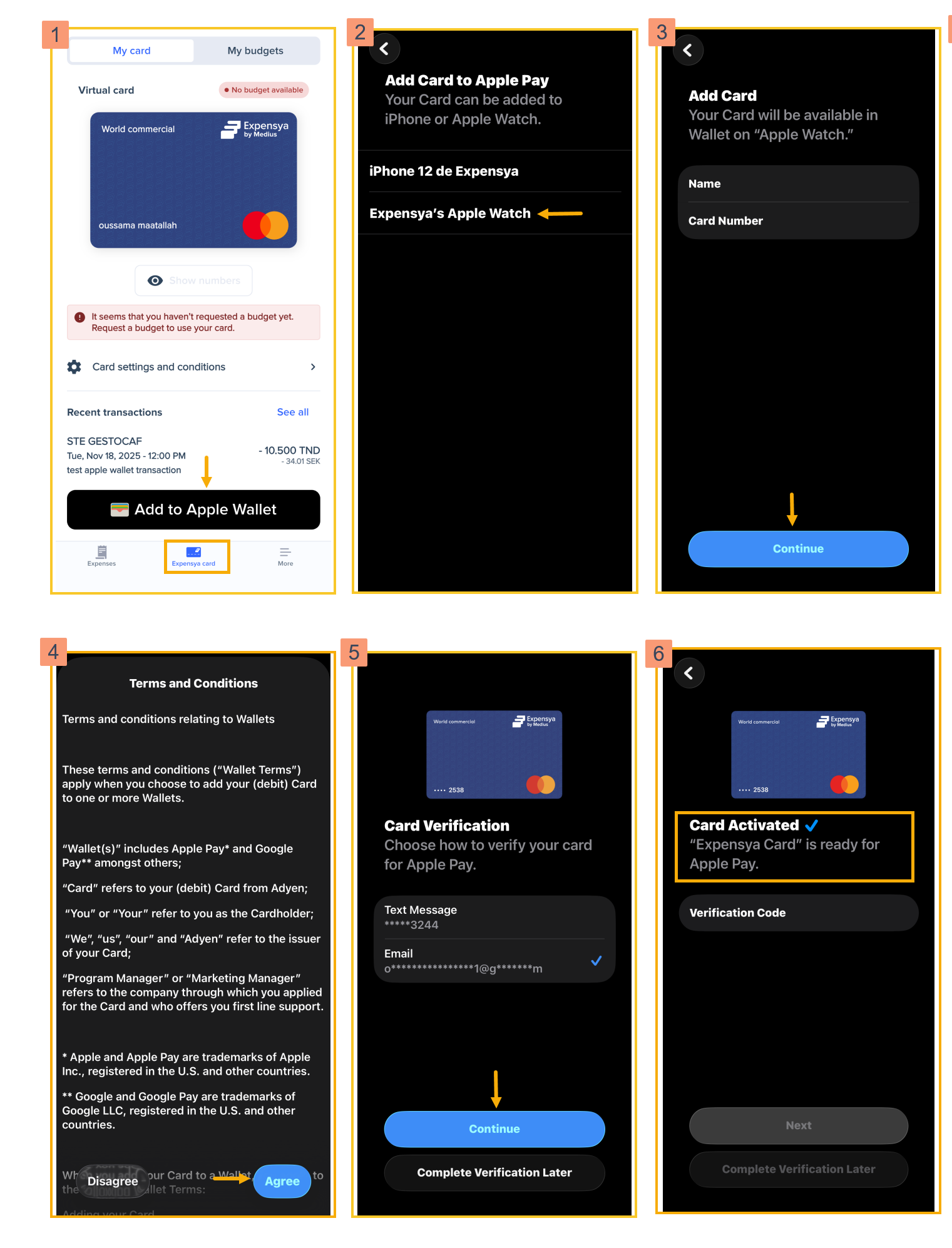
To start, ensure your Apple Watch is paired with your iPhone. Next, follow these steps:
- Open the Expensya app on your iPhone and go to Expensya Card, then tap Add to Apple Wallet.
- You will be asked to choose a device. Select Apple Watch.
If you select iPhone, the card will be added to your phone’s wallet instead.
- The app will display your name and card number. Review the details and tap Next.
- Read the terms and conditions and tap Agree.
- For security reasons, card verification is required. Ensure you complete all verification steps.
- Once verification is complete, a confirmation appears showing that your card is now activated on your Apple Watch.