Usage Dashboard for Report-Count Billing
The Usage dashboard centralizes all usage information for companies billed on Report-Count. Accessible from the Admin panel, it provides a clear view of report consumption and purchased modules, helping you manage usage proactively.
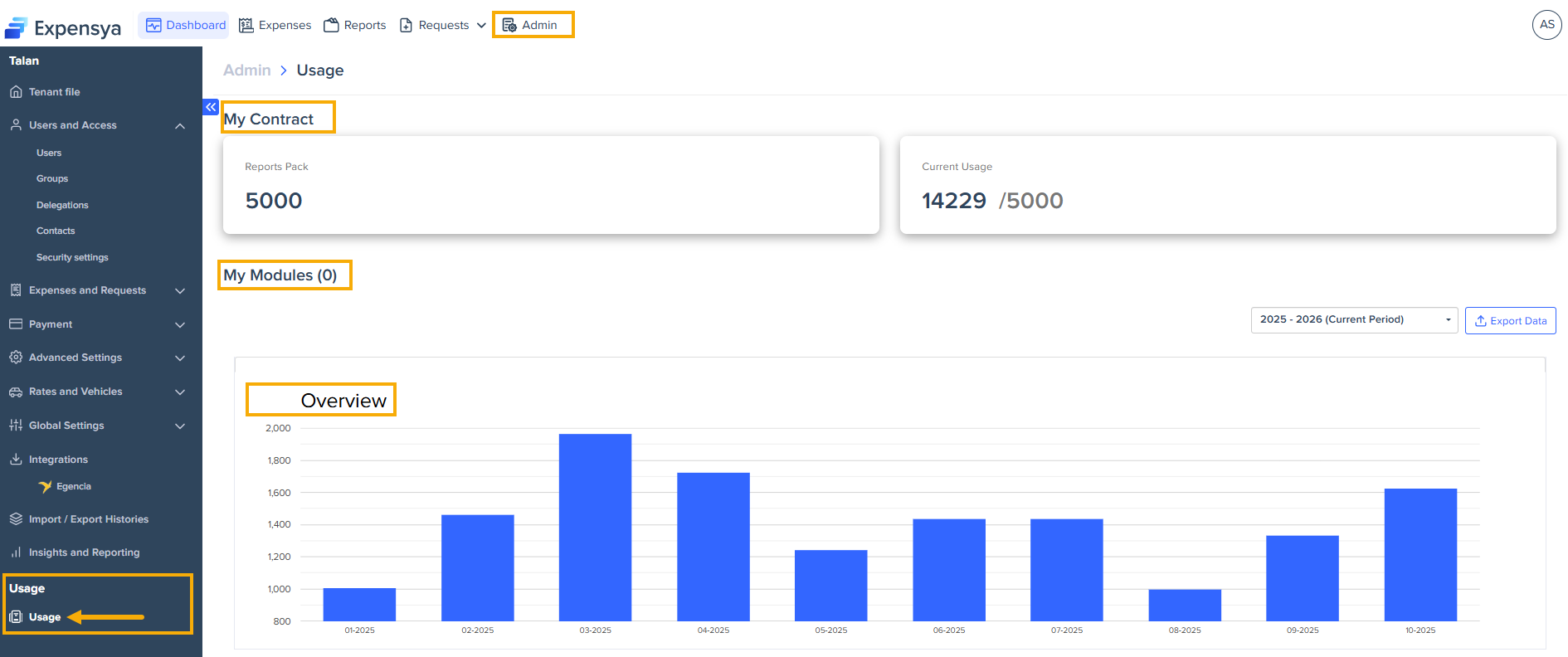
What you see in the Usage dashboard
The dashboard provides a clear overview of your company’s usage and key metrics. You can quickly see when usage approaches or exceeds your pack limit, allowing you to manage it proactively.
Below are the main elements you will find in the dashboard:
- My Contract - includes the Reports pack and Current usage.
- Reports Pack – shows your contracted report threshold.
- Current Usage – displays the number of reports used versus your total pack.
- My Modules – lists the modules your company purchased. You can filter by contractual period or extract data.
- Contractual period filter – switch between current and past billing periods.
- Export Data - export usage data format for reporting or review.
- Overview chart – shows monthly usage for the last twelve months.
Key benefits
The Usage dashboard provides several advantages:
- Transparency – clear visibility into report usage ensures billing accuracy.
- Efficiency – reduces manual requests and support tickets.
- Planning – helps forecast consumption and anticipate renewals.
How to activate the Usage dashboard
- The dashboard is disabled by default. To enable it, contact the Expensya support team or your Expensya account manager.
- Once activated, the dashboard appears in the Usage section of the Admin panel.
The dashboard is only visible to administrators with billing permissions.
